One person runs the night from a phone, tablet or laptop; players watch the screen or open the shared link. Open the app, tap New and pick a tournament type:
Monster DYPA new partner every round, points on your own, one ranking for everybody, then a final bracket for the top players. Best for a night where people come and go.Running the rounds →Start a Monster DYP →
Last One StandingEveryone starts with lives; lose a match, lose a life. 2 vs 2 with a new partner every round, or 1 vs 1. The last player with a life wins.How it works →Start a Last One Standing →
SwissWinners play winners each round; nobody is knocked out. 1 vs 1, BYP or DYP, with a knockout after if you like.How it works →Start a Swiss →
Round robinFixed teams (or 1 vs 1); every team plays every other. First to N wins, most points, or groups and a knockout.How it works →Start a round robin →
Single eliminationTeams (or players, 1 vs 1) in a bracket; lose once and you're out. The quickest cup, with an optional game for 3rd.How it works →Start a single elimination →
Double eliminationTeams (or players, 1 vs 1) in a bracket; you're out after two losses. Fixed pairs (BYP) or partners drawn once (DYP). Best for a cup with a clear winner.How it works →Start a double elimination →
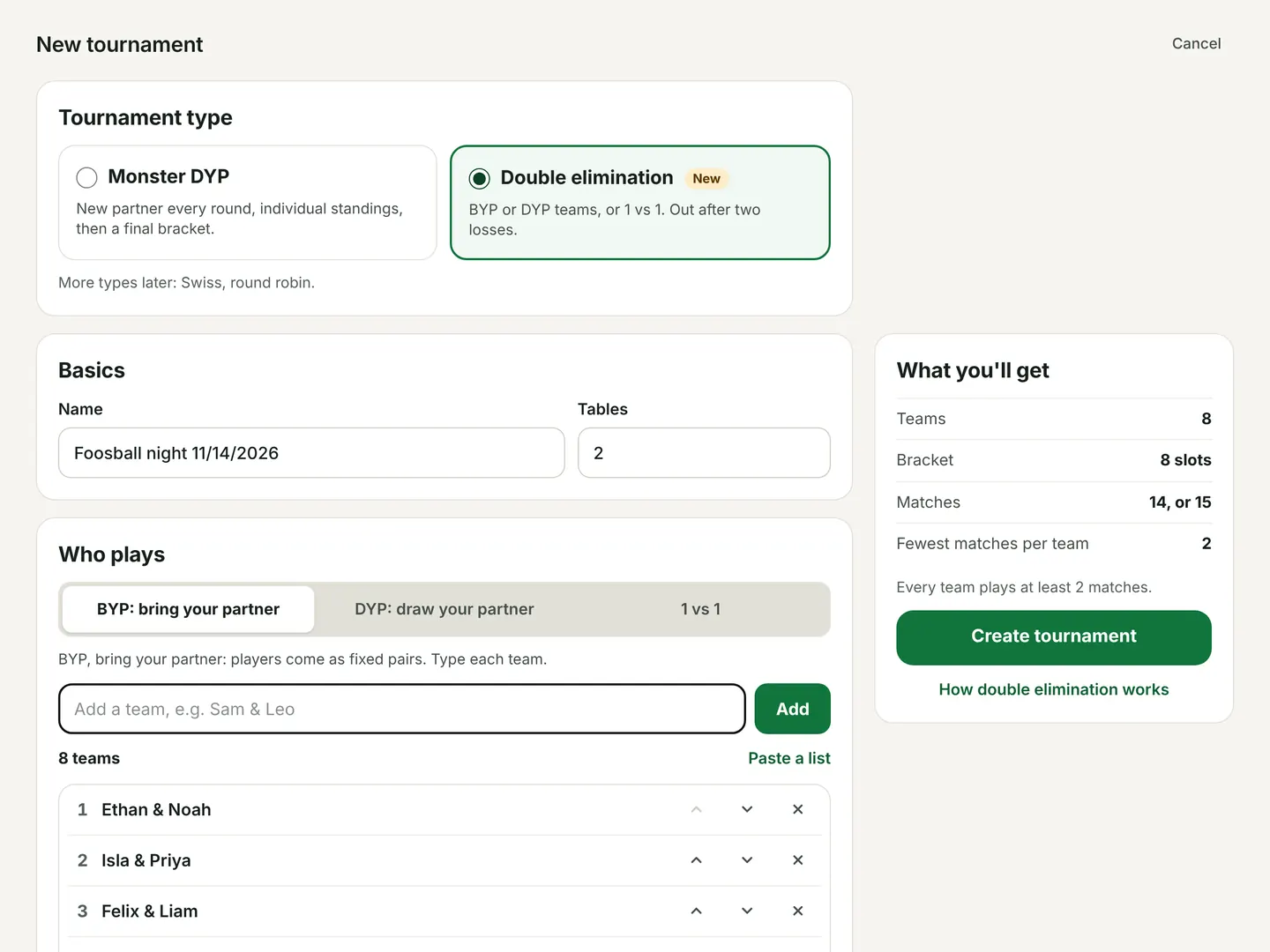
New tournament: pick the type, then add players or teams. The summary on the right shows what you'll get.
For a Monster DYP:
Add players. With Forward/Goalie pairing on, mark each player F or G (tap the badge) and every team gets one of each. Switch it off to draw partners at random.
Set the race (first to 7 by default), the number of tables, how many players make the final, and how players are ranked. You can change any of these later, and the name, from the tournament's Settings section and tap Save. Standings update when you save; games already scored keep their scores.
Tap Create, then Draw round 1.
No account and nothing to install. Tournaments are saved in the browser on the device you use.
Templates
A template is a named set of rules for one tournament type: match format, points, ranking, how the night ends, tables, Forward/Goalie, and the Swiss or round robin options. Players are never saved; you add them fresh each night.
Start with: on New tournament, the picked type shows its templates, Last time's rules and Standard rules. The type's default (★) is picked for you; with no default, last time's rules are.
Starting from a template or last time folds the rules into one strip, so you go straight to the players. Edit rules opens them. Changes apply to tonight only; the strip then offers Update the template or Save as new template.
Played recently shows the players of your last night as chips: tap one to add them, or add them all.
Save a template from New tournament (Save these rules as a template), from any tournament's Settings (Save rules as a template), or with + New on the Templates screen (app home, or Manage on New tournament). There you can edit, rename, make one the default, duplicate or delete (with Undo).
Templates sync to your linked devices and go into your backup file.
Running the rounds
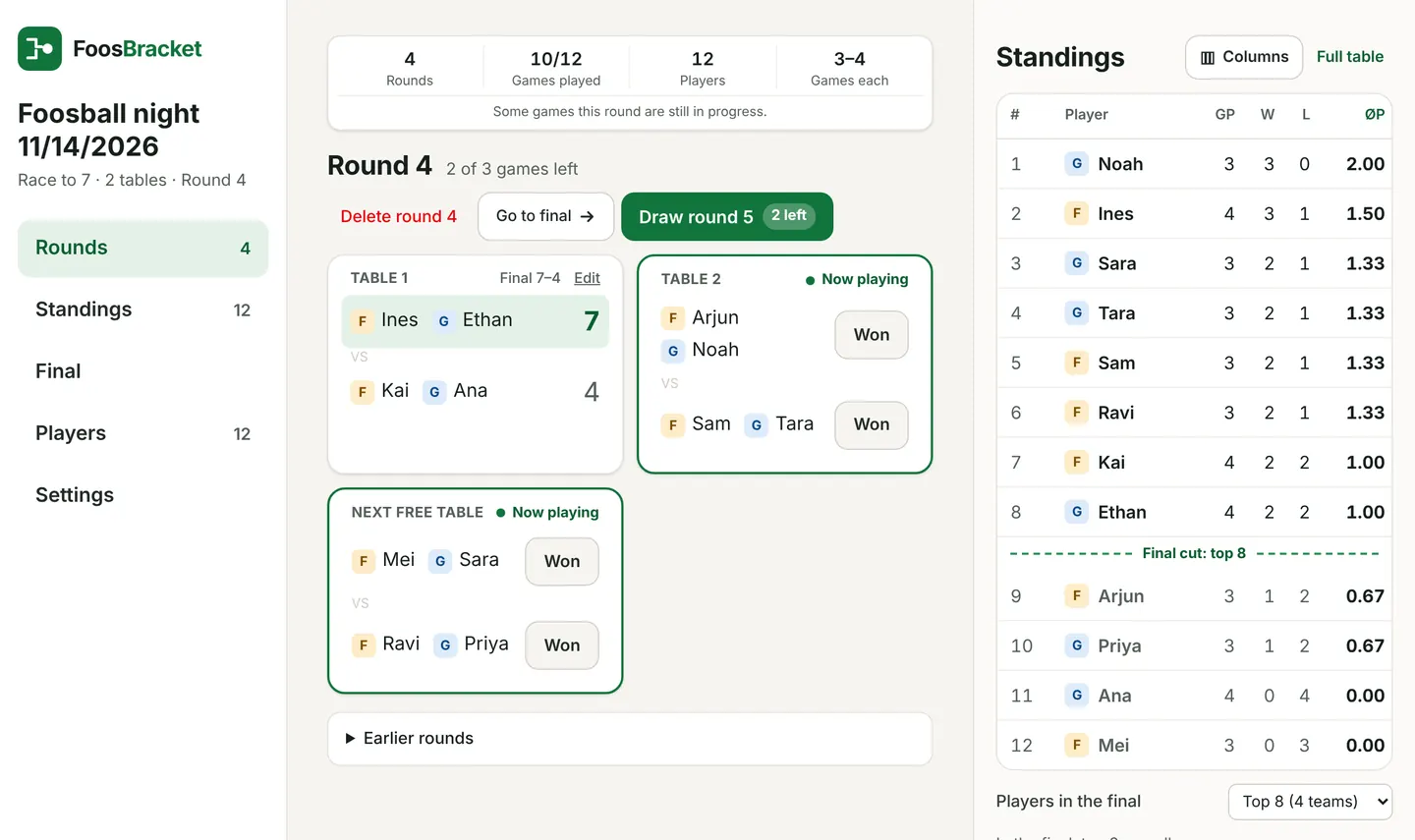
On a laptop: the current round, with live standings beside it.
Draw round pairs partners and puts games on tables. Games beyond the number of tables wait under “Up next”.
Table broken or taken? In Settings, tap the table to switch it off and games go to the others (“2 of 3 tables”). Tap it again when it's free.
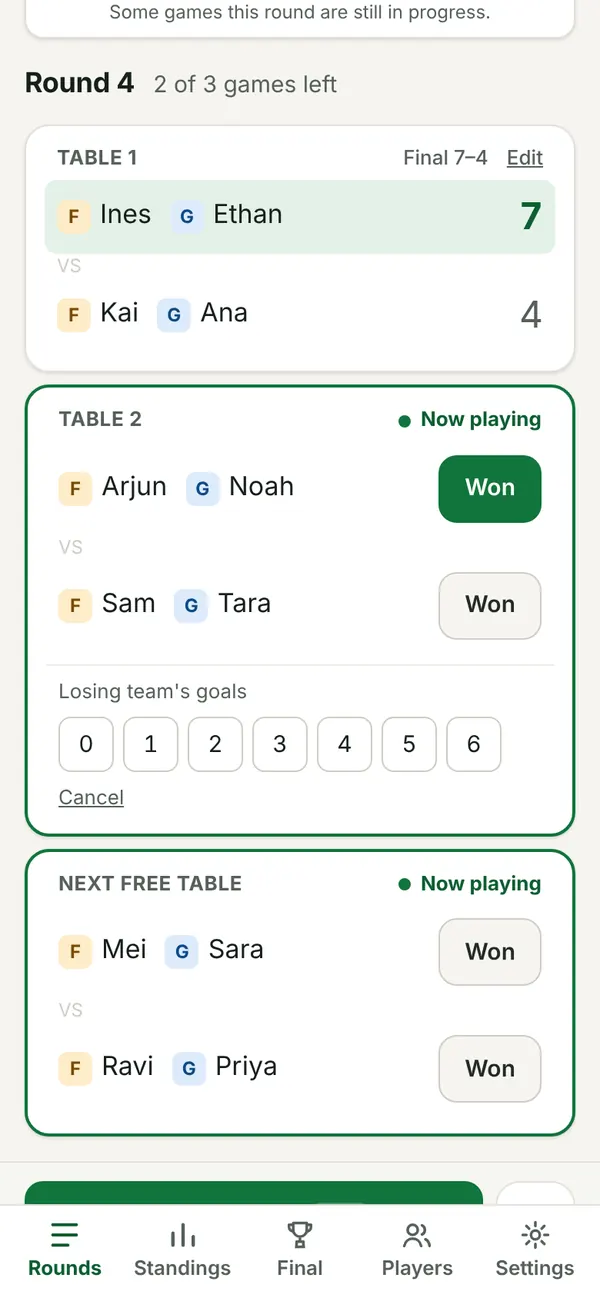
Enter a result in two taps: Won on the winning team, then the losing team's goals. The draw button shows how many games are left (“Draw round 5 · 2 left”) and unlocks when every game is scored.
On a phone: tap Won on the winning team, then the losing team's goals. That's the whole result.
Fair play time: whoever has played least plays next, so nobody gets more than one game ahead. Partners rotate, and repeat partners and opponents are avoided while there's another option.
Uneven Forwards and Goalies: a few players fill in on the other side each round (“flex”), taking turns.
Re-draw (before any score is entered) or Delete round: on phones, tap ⋯ next to the draw button; on bigger screens they're next to the round title. On phones, Rounds, Standings, Final and Players are in the bar at the bottom of the screen.
Players tab: add late arrivals, Pause someone who leaves (they keep their points), switch F/G, and tap a name to rename (it changes everywhere, including past rounds).
Set under How matches are played when you create a tournament (or on the Settings tab until the first score is in).
One game: first to the target wins (race to 7 by default).
Best of 3 / Best of 5: the first team to win 2 (or 3) games wins the match and gets the win points. The other team gets 0, even if they won a game. No draws.
Set number of games: every game is played, e.g. 2 games each to 5. With an even number a match can end level: a draw gives each player the draw points (1 by default). With an odd number there are no draws, so the draw setting is switched off.
Each game can go to any number from 3 to 9. The final has its own format (1 game, best of 3 or best of 5) and never ends in a draw.
Entering results: type each game's score: tap a box, then a number. Type the losing score and the other box fills in with the game target, then it jumps to the next game. Or enter just games won when that's all you know: each team has its own buttons (Won 2–0, Won 2–1; best of 5 adds 3–2), plus a Draw button when a set number of games can end level. Each game won then counts as one goal in goal difference. One-game nights can use Just the winner: tap Won and it's saved (counts as 1–0, no close-loss point), with an “Add the score” link on each match.
Standings show D (draws) when draws are possible and G± (games won minus lost) for multi-game matches. Ties: opponent strength (ØBH, then ØBH2), then G±, then goal difference.
Standings
Players are ranked by average points per game (2 points per win), so sitting out a round never costs a place. Ties go to opponent strength (ØBH), then opponents' opponents (ØBH2), then games won minus lost (multi-game matches), then goal difference.
Ties decided by in Settings changes that order: goal difference first, games won minus lost first, or a custom order (move items up and down, add or remove them). Players still level after all of them are listed by name.
The Standings tab shows every column: games played, wins, losses, win %, goal difference, points, ØP, opponent strength (ØBH, ØBH2) and the last 5 games. On phones the names stay put while you swipe the numbers. Tap a column name for what it means, and filter Forwards or Goalies.
The standings next to the rounds show games played, wins, losses and ØP. Columns changes that; the shared page uses the same choice (unless you turn it off), and players can tap Show all stats for the rest.
A dashed Final cut line shows who's in the final right now.
The final
No final? First to N wins. In Rules, set How the night ends to First to N wins (e.g. 5). The player who reaches 5 wins in the fewest matches is champion; rounds go on until 2nd and 3rd are decided too. If someone gets to 5 while others have played fewer matches and could still catch up, the result waits until they have played as many (paused players aren't waited for). Players who reach 5 in the same number of matches play off 1 vs 1 (Start the play-off) or share the place. Placed players keep playing unless you pause them.
Players in the final (top 4 to 16) is set when you create the tournament and can be changed any time until the final starts: on the Standings tab or the Final tab.
Teams are formed 1+5, 2+6, 3+7, 4+8 by default for a top 8: each player in the top half with the one the same distance down the bottom half (top 10: 1+6, 2+7…; top 6: 1+4, 2+5, 3+6). The Final tab offers other pairings, such as always Forward + Goalie, and lets you set the race for the final.
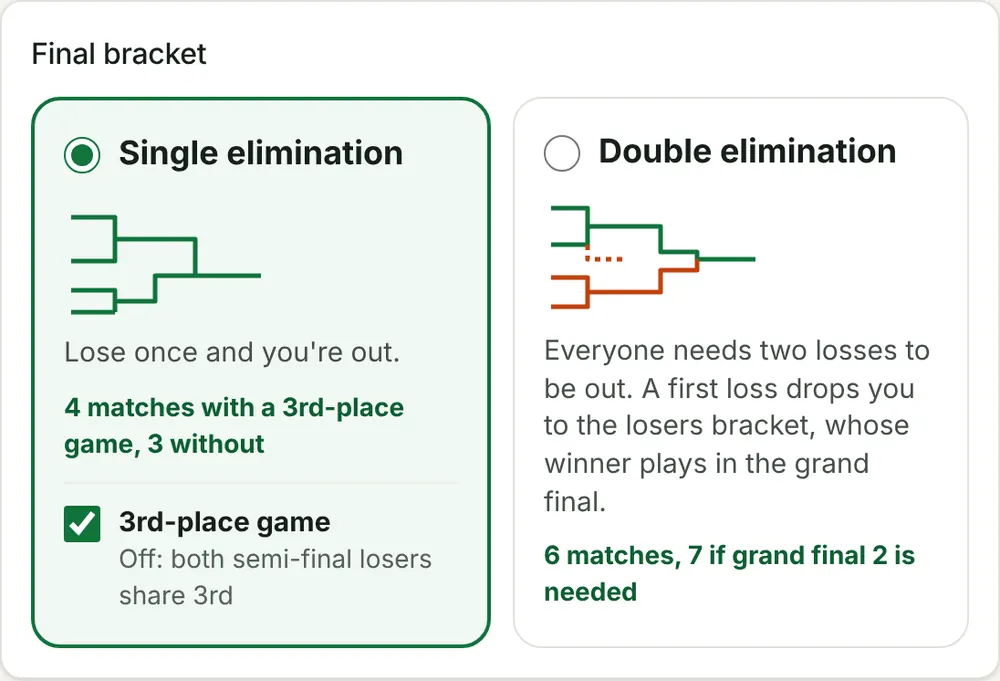
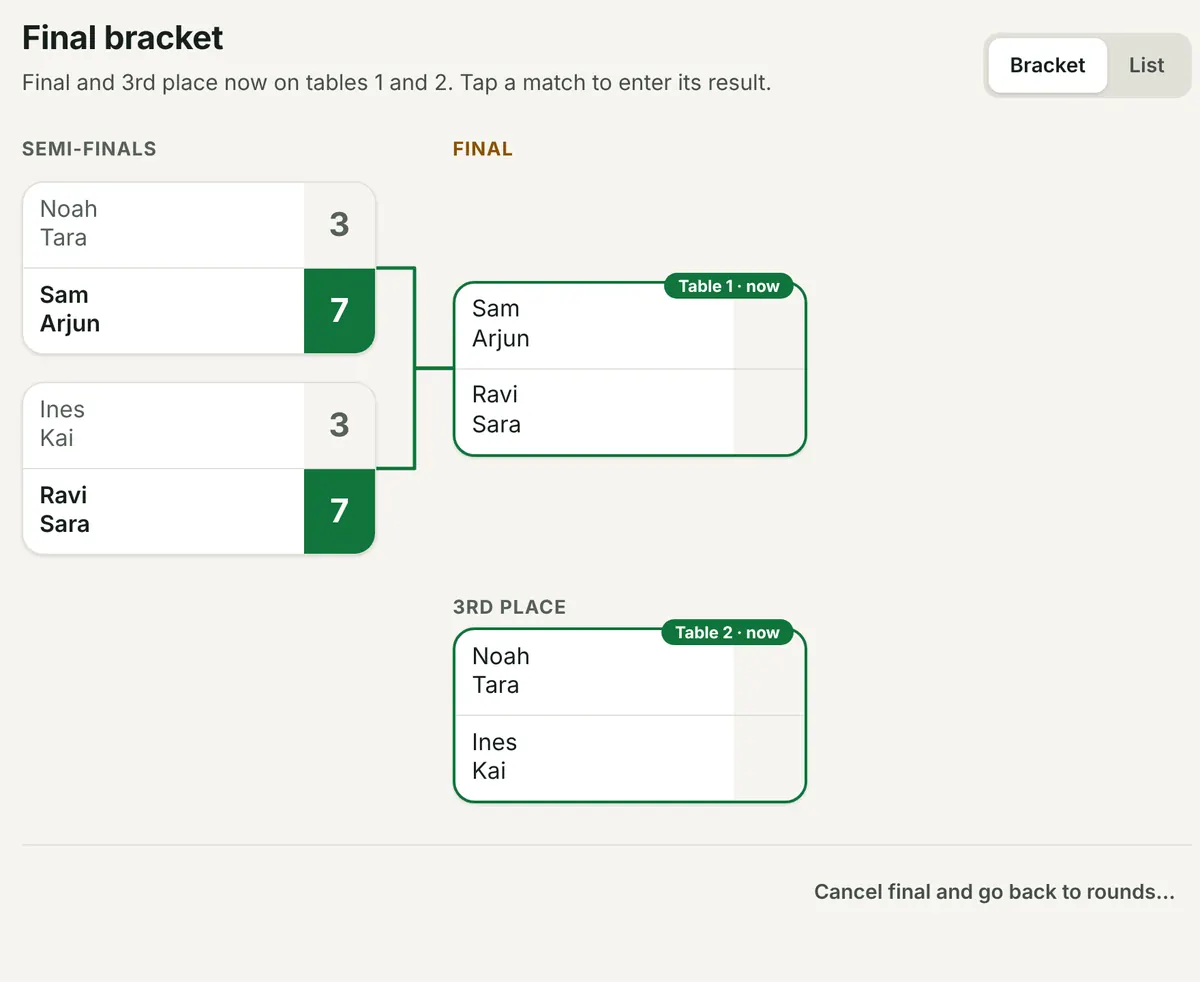
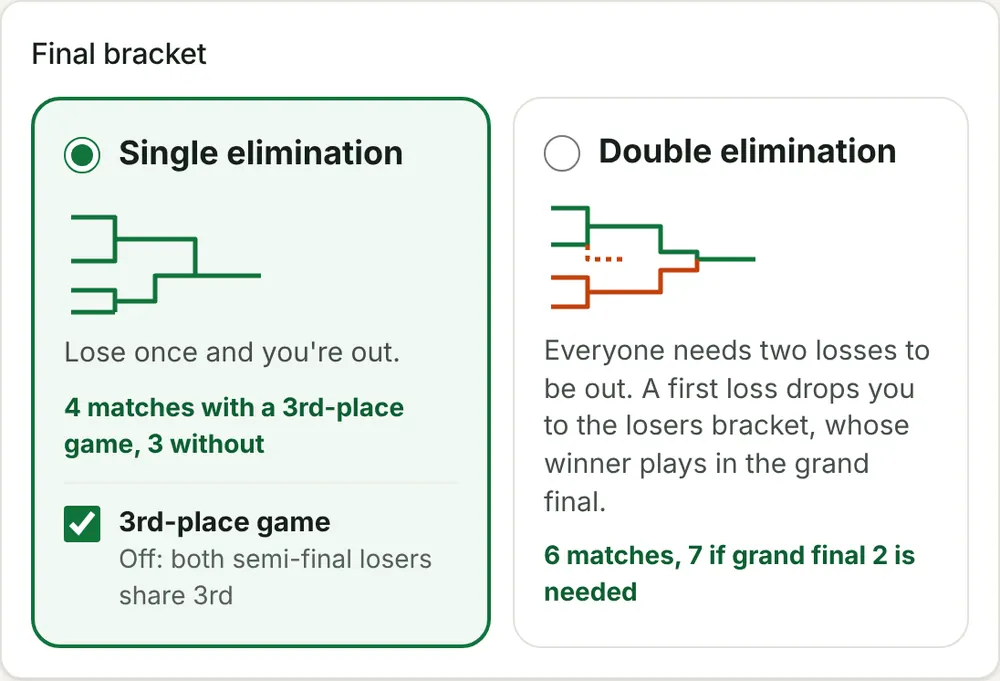
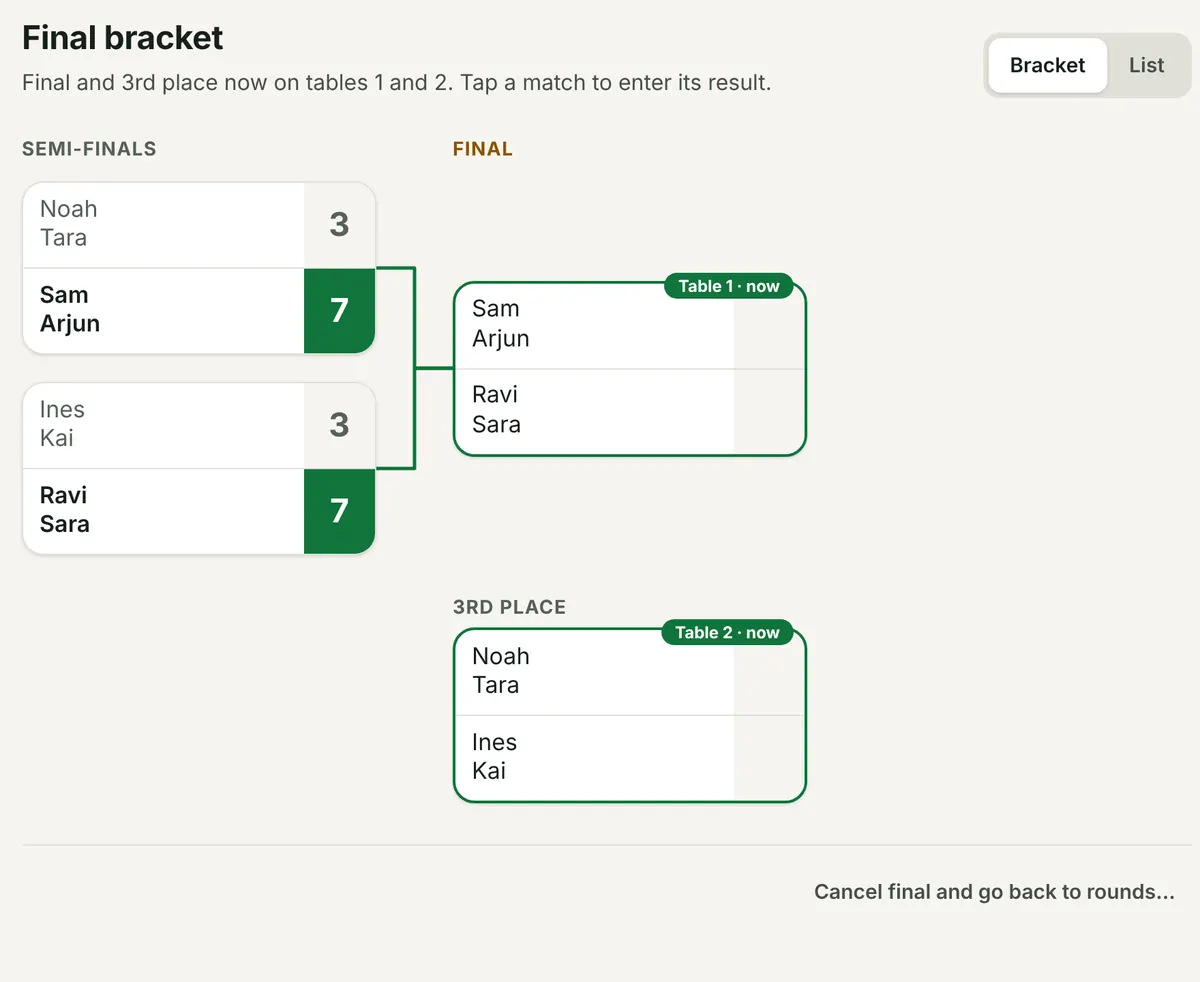
Pick Single elimination (lose once and you're out) or Double elimination (out after two losses; needs 3+ teams). With an odd number of teams, top seeds get a bye. Single elimination has a game for 3rd place, which you can switch off: then both semi-final losers share 3rd.
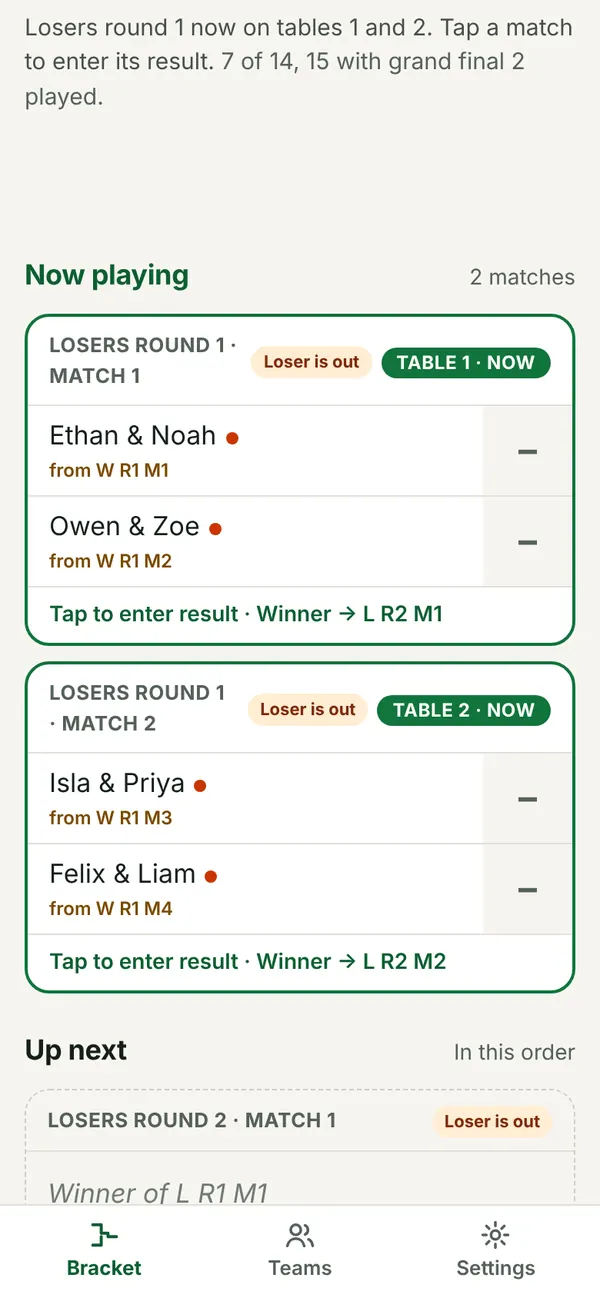
Start the final with Start final bracket. Matches on a table are outlined with their table number; tap one to enter its result. Lines turn green as winners move on, and empty slots say who they're waiting for (“Winner of SF 1”).
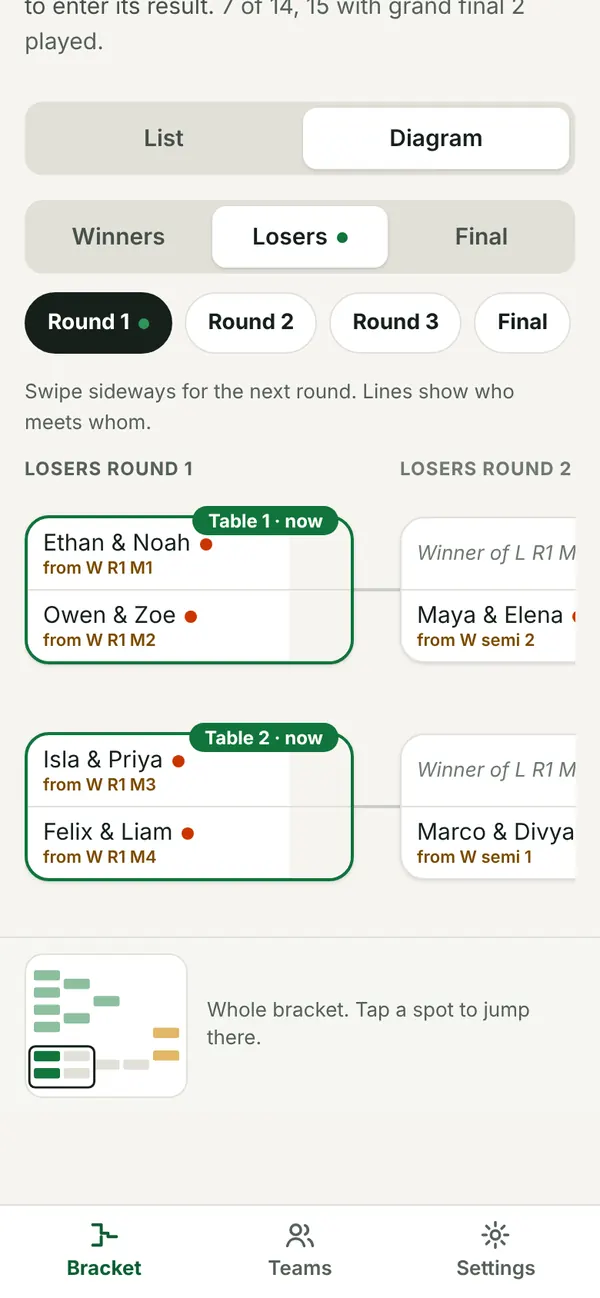
On a phone the final is a list (Now playing, Up next, then finished games) or a Diagram: swipe one round at a time, tap a round to jump to it, and use the small map of the whole bracket. Your phone remembers which you picked. On a laptop, a big final folds the standings away (they stop changing once the final starts) so the bracket has room.
Final tab: single or double elimination.The bracket: lines turn green as winners move on.
When the final ends, a podium shows the champions, runners-up and 3rd place, and a list of all places.
Changing a result that later games depend on asks first, since those later results are cleared.
Last One Standing
Tap New, pick Last One Standing, then who plays: New partner every round (2 vs 2, optional Forward/Goalie) or 1 vs 1. Everyone starts with the same lives, 1 to 10 (3 by default).
Each round, everyone on the losing side loses a life. Lose your last life and you're out. There are no draws: pick one game, best of 3 or 5, or a set odd number of games (3 to 9).
Who plays: players who have sat out more often play first, and opponents are kept close in lives. Partners and opponents repeat as little as possible. With fewer than four players left it goes 1 vs 1. With Final three play 1 vs 1 on (the default), the last three play one match at a time, and the player who sat out plays next.
Standings: lives, then the round you went out (later is better), then goal difference. Players out in the same round with the same goal difference share a place.
Walkover: if someone doesn't show, tap Didn't show? Walkover on the match. The absent side loses a life and no goals are recorded.
Players tab: − / + takes or gives a life with a reason (shown in the history, and undoable). Pause someone who leaves: they keep their lives. A late player joins with the average lives of those still in, rounded (you can change it). With Bring back on, a knocked-out player can come back with the lives you set.
How it ends: the last player with a life wins, or turn on Knockout and start a bracket for the top players from the Knockout tab whenever you like: as pairs (formed like a Monster DYP final) or 1 vs 1, single or double elimination.
Tap New, pick Swiss, then who plays: 1 vs 1, BYP (fixed pairs), DYP: pairs drawn once (the app draws the teams, which then stay together) or DYP: new partners every round. 4 to 64 entries.
Round 1 is drawn at random (or by seed). After that, you play someone with the same record: 2 wins v 2 wins, 1 v 1. Nobody is knocked out and you never meet the same opponent twice. Each next round is drawn from the standings when the last result is in: tap Draw round N.
Pairing:Monrad (default) pairs neighbours in the standings, 1 v 2, 3 v 4, so the leaders meet early. Dutch pairs the top half of a score group with the bottom half, 1 v 5, 2 v 6 of 8, so the leaders meet late. Someone who can't be paired on their score plays the next group down.
Rounds: the app suggests enough for one clear winner (8 entries: 4, 16: 5, 24: 6). Add a round any time. If every pairing would repeat a match, it says so and lets you draw with the fewest rematches instead.
Byes: with an odd number, the lowest-placed entry who hasn't sat out sits out (nobody twice before everyone once). By default a bye counts as a win; it can also earn nothing, or a win with half the score.
Standings: points, then ØBH (Buchholz: the average points of everyone you played), ØBH₂ (their opponents' ØBH), games ±, goal difference. Tap any column name for what it means.
After the Swiss: the final standings, or a knockout of the top 2–16, single or double elimination. A 1 vs 1 Swiss can play its knockout as pairs formed from the standings: 1+5, 2+6, 3+7, 4+8 by default, or 1+8, 2+7, 1+2, 3+4, top half with a random partner, or random.
DYP with new partners every round runs like a Monster DYP (individual standings, sit-outs in turn, a final at the end), but each round the players close in the standings play together: in groups of four by standing, 1st + 4th v 2nd + 3rd, never the same partner twice.
During the night: pause someone who leaves (not drawn again until they're back); add a late entry, who joins the next round with 0 points. Undo a round's draw until its first result is in.
Tap New, pick Round robin, then who plays: BYP (fixed pairs; give a team a name with Sharks: Sam & Leo), DYP (the app draws the teams once) or 1 vs 1. 3 to 32 teams. You see the teams (and groups) before you tap Start.
Every team plays every other team once per pass. Each round, every team plays once (odd numbers: one team has a bye). By default (Next free table) a match starts as soon as a table is free and both teams are ready, so tables never sit idle; with Round by round the next round starts only when this one is done.
The table counts match wins, never game wins: a 2–1 in best of 3 is one win. Ties: games ±, then goal difference, then the match between the two teams.
First to N wins: the first team to N match wins is champion, and the schedule repeats until someone gets there. A team at N is only champion once nobody with fewer matches can still catch up (paused teams aren't waited for). Teams that reach N in the same number of matches play off or share the place. Rounds go on for 2nd and 3rd.
Most points after the schedule: every pair plays once (or twice); points for a win, a draw (only with an even, set number of games) and an optional close-loss point. Top of the table wins.
Knockout after the round robin: with one table, the top 2–8 go through, seeded 1v4, 2v3 (1v8, 4v5, 2v7, 3v6). With two groups, the top of each group go through crossed: A1 v B2, B1 v A2. With three or four groups, the winners go through, then the best runners-up. Single or double elimination, optional 3rd place. It starts by itself when the last group match is in, or tap Start the knockout; starting early drops the group matches not played yet.
Teams: pause a team that leaves (its matches still to play are skipped, not lost), or add a late team: it plays everyone in its group, one match in each coming round alongside everyone else.
Tap New, pick Single elimination, then who plays: BYP (type in fixed pairs), DYP (enter players; the app draws the teams once) or 1 vs 1. 2 to 32 teams.
Seed in the order you enter (1 is the strongest) or at random. With an odd number, the top seeds get byes into round 2.
Lose once and you're out. The semi-final losers play for 3rd, or switch the 3rd-place game off and they share 3rd.
Matches can be 1 game, best of 3 or best of 5. The bracket, the List | Diagram views on phones and sharing work the same as in double elimination.
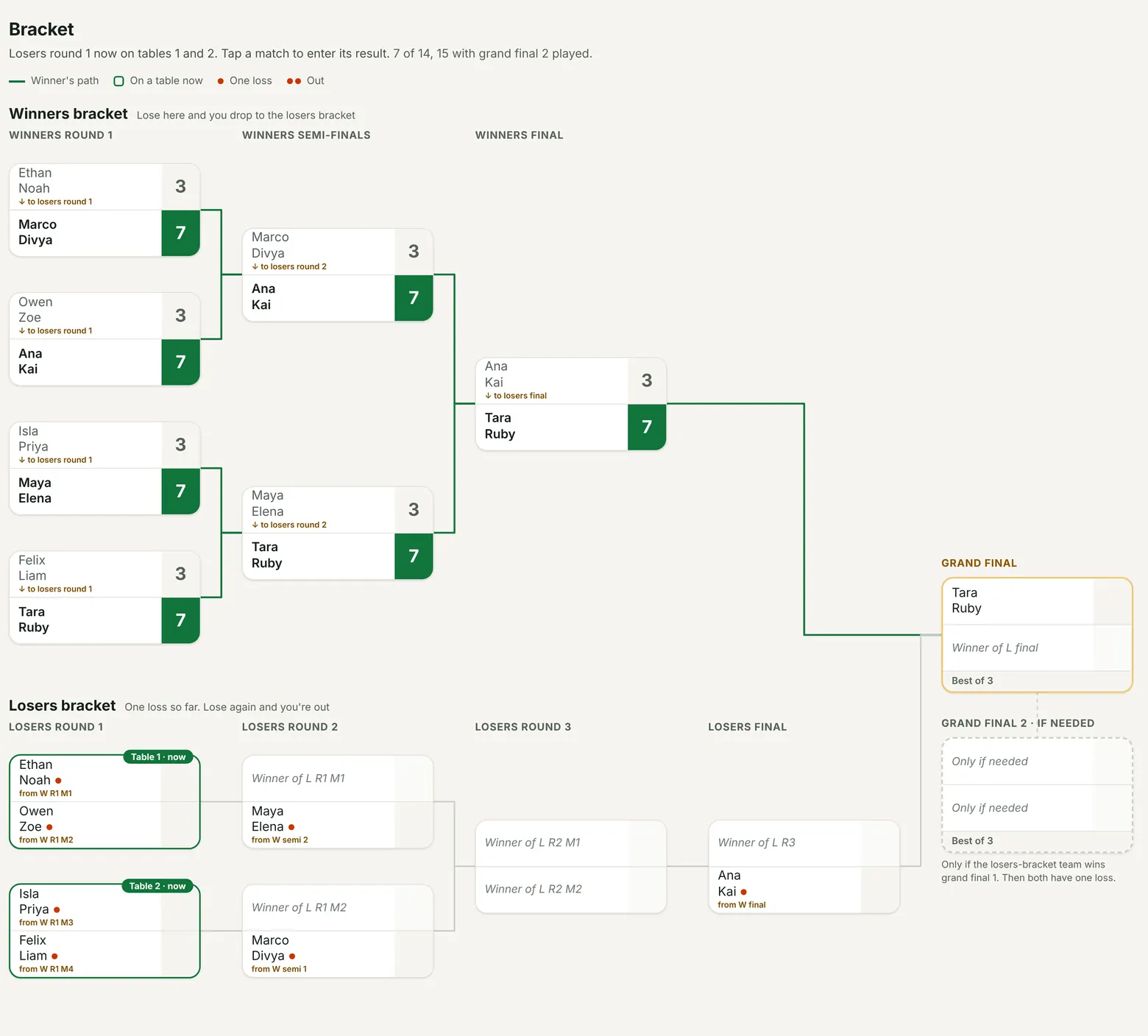
Winners bracket on top, losers bracket below, grand final on the right. Dots are losses; “↓ to losers round 1” shows where a loser goes. Tap to open full size.
Every team needs two losses to be out. Everyone starts in the winners bracket; a loss drops you to the losers bracket, and a loss there knocks you out. The two bracket winners meet in the grand final.
Must lose twice (the default): if the losers-bracket team wins the grand final, both have one loss and grand final 2 decides it. Or choose One grand final for a shorter night.
Use it as the final after Monster rounds (Final tab), or as a tournament on its own: New tournament → Double elimination, with BYP (bring your partner: type fixed pairs), DYP (draw your partner: enter players, partners are drawn at random once, optionally Forward + Goalie) or 1 vs 1.
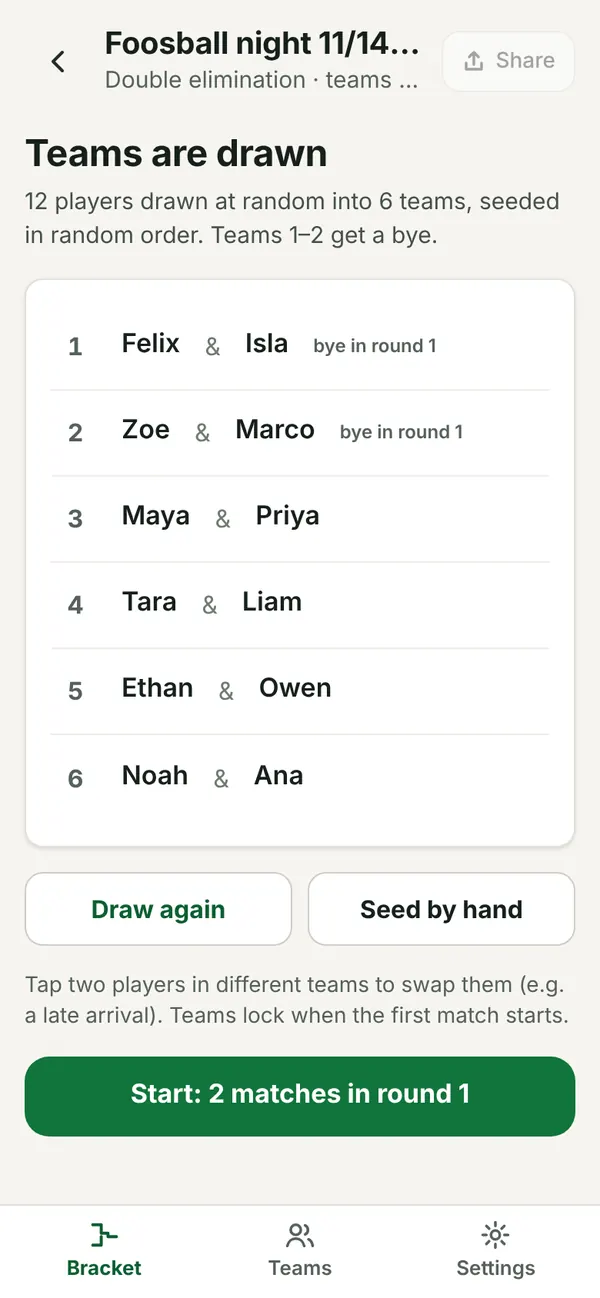
DYP shows the drawn teams first: draw again, swap two players, or seed by hand, then tap Start. BYP and 1 vs 1 are seeded in the order you enter them (use the arrows) or at random.
With n teams there are 2n − 2 matches (one more if grand final 2 is played). Byes go to the top seeds and never count as a loss. Matches can be 1 game, best of 3 or best of 5; the losers bracket and the grand final can differ (the grand final is best of 3 by default).
Teams that drop from the winners bracket are placed so they don't meet someone they just played. 3rd and 4th come from the losers bracket; teams out in the same losers round share a place (=5th, =7th…).
In the bracket, dots show a team's losses, “↓ to losers round 2” shows where a loser goes, and matches on a table are outlined. Free tables go to earlier stages first, winners bracket first on a tie.
List: what's on now, what's next.Diagram: one round at a time.DYP: check the drawn teams, then Start.
Tap Share on a tournament. It goes onto your organizer page by default, or you can publish a single link for just that tournament.
Show the QR code (in the Share screen, or Show QR for players on app home for your page) so players can follow along on their phones. They don't need an app or an account.
The shared page updates by itself when a round is drawn, the final starts, a final score is entered, or players are renamed or added. Scores inside a round go up with the next draw, or tap Update page.
Follow a player: on the shared page, each player can pick their name. Their games and standings row are highlighted, and a card shows their rank, record and where they play next. It's remembered on their phone only.
Live pages refresh themselves every minute. On phones they have tabs (Now or Final, Standings, Rounds; a double elimination has Bracket and Teams, with List | Diagram for the bracket); laptops show everything at once.
Download as HTML file saves a results page you can keep or send.
Remove from my page or Stop sharing takes it offline. Deleting a shared tournament asks whether to delete it from this device only or from your page too.
Your organizer page
On app home, Your tournaments is where you edit. What players see is your public page: it's read-only for everyone, including you, so “Open player view” shows exactly what players get.
Run tournaments every week? An organizer page gives you one link for all of them, like foosbracket.vercel.app/o/monday-monster. It shows the latest tournament first (live while it's running) and every past one below it. Post it in your group once and it stays current.
Create it from app home (“What players see” → Create page) or the Share screen: pick a name, a link, and a passcode. Save the recovery code you're shown.
Add every shared tournament (on by default) puts new shares onto the page.
Add earlier shares moves tournaments you shared with single links before you had a page. Their old links forward to the page.
Rename or delete page (under “What players see”) renames the page (the link stays) or deletes it with your passcode. Deleting removes the page and its links; your tournaments stay on your device.
Linking devices
Run the night from a laptop and check it from your phone, or switch devices halfway. Linked devices share every tournament on your page. Because tournament laptops are often shared, linking needs your passcode on both devices.
On a linked device: app home → “Devices & backup” → Link or manage devices → Link another device → enter your passcode.
A QR code and an 8-character code (like K7Q4-M9PD) appear. They work once, for 10 minutes.
On the new device, scan the QR code, or open FoosBracket and tap I have a link code. Enter the passcode and give the device a name.
Staying in step: devices sync when the app opens, after each draw and final score, and when you tap Sync now. The most recently saved copy wins; if both devices changed the same tournament, the other version is kept as “(this device's copy)”, so nothing is lost. Copies are folded under their tournament on app home; tap Review copies to keep one. Anything you delete stays in Recently deleted on that device for 30 days.
Private tournaments (not on your page) stay on the device they were made on. Move them with a backup file.
Remove a device from the list in Devices, or use Unlink other devices if a phone is lost. Both need the passcode.
Switching pages: linking to a different page means this device stops updating its old page (the page stays online). Its tournaments from the old page are marked “On another page”.
iPhone: FoosBracket added to the home screen keeps its own storage, separate from Safari. Link it with I have a link code inside the home-screen app rather than by scanning with the camera.
Passcode & recovery
Your page passcode is 4 to 8 digits. It's needed to link a device, remove devices, change the passcode and delete the page. It's not needed to run tournaments, share or sync, so anyone at the laptop can still keep the night going.
Five wrong tries lock it for 15 minutes. A link code stops working after five wrong passcodes.
Recovery code: shown once when you create your page (or set its first passcode). Save it in a password manager or the downloaded file.
Forgot the passcode? On any linked device: Link or manage devices → Forgot passcode? → enter the recovery code and a new passcode. That recovery code is used up and you get a new one to save.
Lost the recovery code? Link or manage devices → New recovery code (needs the passcode).
Backup & restore
Tournaments live in your browser. If you clear it, lose the device, or move to a new one, a backup file brings everything back.
App home → “Devices & backup” → Download backup saves every tournament on the device as one file. Keep it somewhere safe: Google Drive, Dropbox, email it to yourself, or a USB stick.
Include a way back into your page (optional) lets you link a new device to your page from the file if you lose all your devices. Restoring it asks for your page passcode, so the file alone can't change anything. Only the latest backup from each device works, and removing a device from your page also turns off its backups.
Restore from file on any device. It shows what will happen first: new tournaments are added, identical ones are skipped, and different versions are kept side by side as “(from backup)”. Nothing is overwritten.
Make it a habit: download a backup after each tournament night.
Install as an app
iPhone / iPad (Safari): Share → Add to Home Screen.
Android (Chrome): menu ⋮ → Install app (or Add to Home screen).
Laptop (Chrome or Edge): the install icon in the address bar.
The installed app opens full screen and keeps working without internet. Sharing and syncing catch up when you're back online.
Privacy & limits
On your device: every tournament, saved in the browser. Nothing leaves it unless you share or link a device.
When you share: the tournament (player names and scores) is stored so the page can be shown. Anyone with the link can view it; pages aren't listed in search engines.
Passcodes and recovery codes are stored only in scrambled (hashed) form, so they can't be read back.
Free: FoosBracket runs on a free hosting plan. If its monthly storage limit is ever reached, sharing pauses until the next month (the app tells you) and everything keeps working on your device.